
Focus
Ficus
Focus Ficus is a mobile app that aims to help users avoid mindless scrolling and distractions. The app uses a quest for collection and achievement to help users build better habits.
This project is a personal project I've been working on with a developer friend.
QUICK VIEW


App Concept
When a user starts the focus timer, a digital plant begins to grow and the phones non-emergency functions are locked. Based on how long the user can keep the timer going, the likelihood of the plant will be new or rare increases.
Background
& Research
I started this project with research and with surveys of family and friends to determine what motivates people, as well as what distracts or inhibits people from staying focused on daily tasks.
I also checked out other competing apps to see what is already available and how saturated the market is.
.jpg)
.jpg)
A survey was collected from 20 individuals who represented our potential target audience. The survey was 10 questions about screen time, motivation and focus ability. Here are some things the survey revealed:
-
Despite only 60% of people using their cell phone for work, 90% of people feel that they need to have their phone at hand during the day.
-
90% of people surveyed say that they know or could approximate their average screen time outside of work. 30% of those people are even aware of their screen time on a daily basis.
-
It was also noted that when asked what motivates the forming of new habits, over 60% of surveyed users mentioned looking toward the future or some form of reward.
Synthesizing information
Personas & Flows
Building out user personas and flows before beginning designs helps to think from multiple points of view, ensuring that the app will be helpful for more than just one kind of user.


.jpg)
Information
Architecture
I also sketched out (in Figma) the information architecture that would exist behind the front facing part of the app. This works hand in hand with the user flows and helps me foresee what kind of design elements we will need moving forward.
Survey Results
DESIGN Phase
Sketching &
Ideation
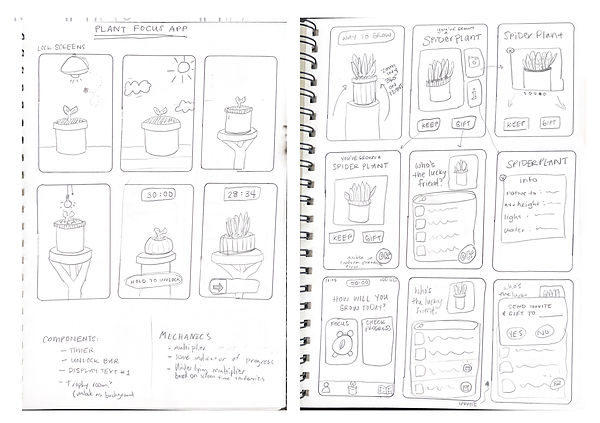
I love to start sketching on paper. It's quick, easy, and dirty. It lets me get all my ideas out- both good and bad! In this way the process moves towards finding and culling the best design nuggets from across all the sketches.
Palette &
Design choices
After initial sketches I also made some basic design choices to build out a palette and the start of a design system.
.jpg)
Low-FI Wireframes
I used Balsamiq to put together low-fi wireframes from my sketches before moving into Figma to spend real time in designing frames.
Wireframing
Hi-Fi Wireframes
At this point more serious wireframes were developed in Figma to demonstrate some of the user flows. These wireframes are also turned into working prototypes to allow potential users to walk through them and give feedback.
This is a more hi-fidelity look at what the “quick start” flow would look like in this app with the style guide applied.
.jpg)
This is the reverse flow- the flow that ends the growth of a plant! The user agrees to stop their timer and gets to discover what type of plant their hard work has earned them. The plant is added to their “Greenhouse” so they can keep track of their progress over time.
.jpg)
To be continued...